How to Use Ads
Find out more about how to set up and manage your ads to grow your business.
Background
To address the challenges sellers face in efficiently scaling new campaigns and optimising existing ones, we introduce "Rapid Boost", a smart acceleration tool designed to help sellers scale faster and achieve better campaign results.
What is "Rapid Boost"?
Rapid Boost is a seller-authorized, algo-driven tool for GMV Max Custom ROAS campaigns. Once sellers turn on "Rapid Boost" toggle, the system will automatically accelerate campaign performance by providing additional traffic boost and exploring ROAS up to 30% lower than the seller's target ROAS. This helps effectively break through the learning phase or high-traffic period for sellers who want to focus on getting more sales.
How "Rapid Boost" Helps Your Campaigns
1. Campaigns In Learning Phase
2. Campaigns After Learning Phase
How to enable "Rapid Boost" for new ads?
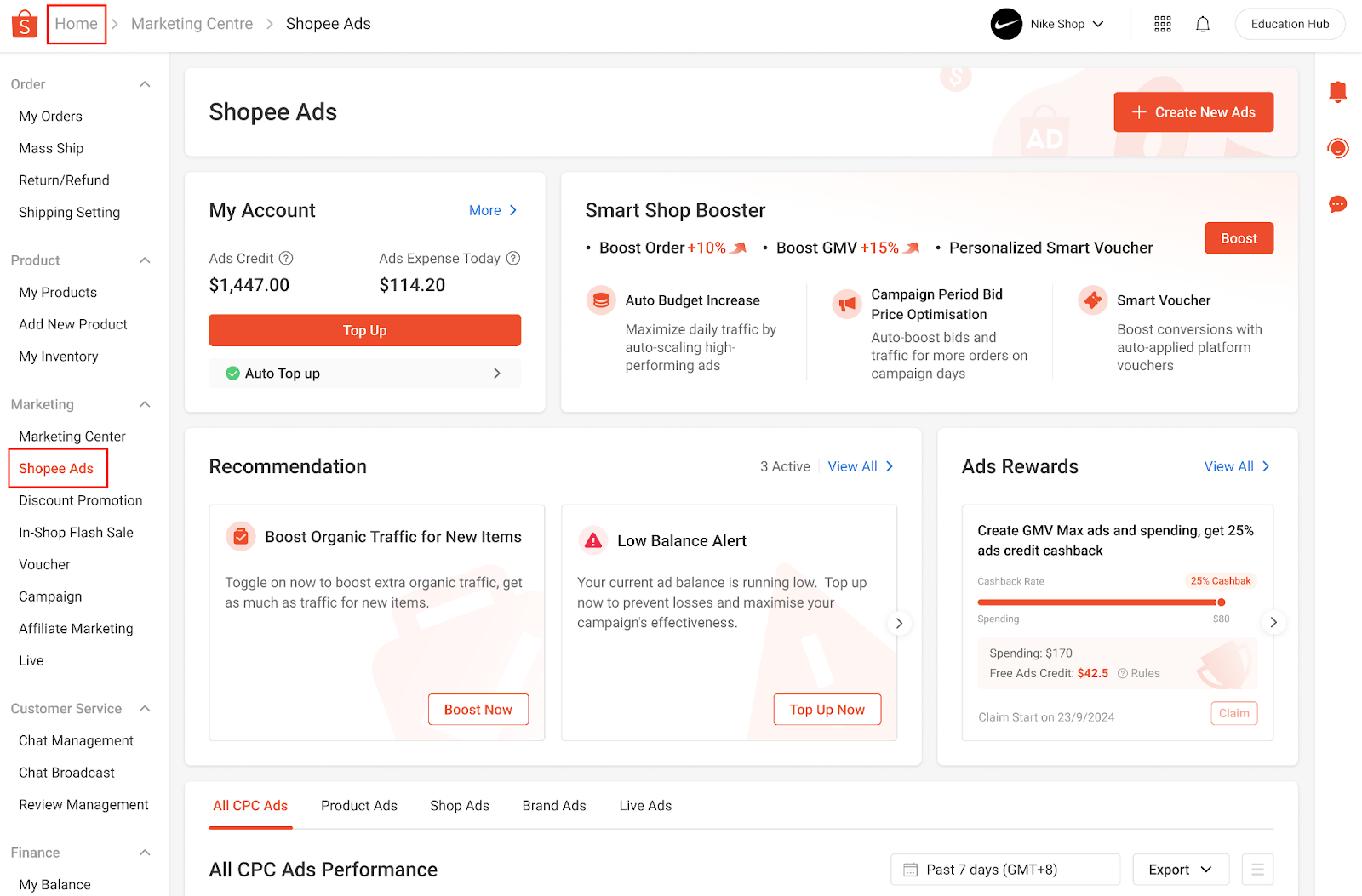
1. Enter Shopee Ads: From the Shopee seller center homepage, navigate to the Marketing Center and select Shopee Ads.
2. Enter Promote My Products: Click on "Create New Ads" and select "Promote My Product".

3. Choose GMV Max Custom ROAS: On the Ads Creation Page, select your target products and set the bidding method to GMV Max Custom ROAS. Rapid Boost is available on both single product and ad group.


4. Enable Rapid Boost: Scroll down to find the "Rapid Boost" column. Toggle the switches to enable Rapid Boost for your chosen products.


Where to Activate "Rapid Boost" for existing ads?
1. Recommendation Card

2. Ads List Banner


3. Ad Detail Page

How to Check If an Item Has Rapid Boost Enabled
Method 1: Check in the Ads List

Method 2: Check on the Ad Detail Page
Rapid Boost FAQ
1. What happens to the ROAS Protection eligible amount calculation when a seller enables Rapid Boost?
2. Can a seller use Rapid Boost and Campaign Surge features simultaneously?
3. What are the differences between using Rapid Boost and manually lowering the target ROAS?
Compared to manual adjustments, Rapid Boost has two key advantages:
Was this page helpful?
 Yes
Yes No
NoBackground
To address the challenges sellers face in efficiently scaling new campaigns and optimising existing ones, we introduce "Rapid Boost", a smart acceleration tool designed to help sellers scale faster and achieve better campaign results.
What is "Rapid Boost"?
Rapid Boost is a seller-authorized, algo-driven tool for GMV Max Custom ROAS campaigns. Once sellers turn on "Rapid Boost" toggle, the system will automatically accelerate campaign performance by providing additional traffic boost and exploring ROAS up to 30% lower than the seller's target ROAS. This helps effectively break through the learning phase or high-traffic period for sellers who want to focus on getting more sales.
How "Rapid Boost" Helps Your Campaigns
1. Campaigns In Learning Phase
2. Campaigns After Learning Phase
How to enable "Rapid Boost" for new ads?
1. Enter Shopee Ads: From the Shopee seller center homepage, navigate to the Marketing Center and select Shopee Ads.
2. Enter Promote My Products: Click on "Create New Ads" and select "Promote My Product".
3. Choose GMV Max Custom ROAS: On the Ads Creation Page, select your target products and set the bidding method to GMV Max Custom ROAS. Rapid Boost is available on both single product and ad group.
4. Enable Rapid Boost: Scroll down to find the "Rapid Boost" column. Toggle the switches to enable Rapid Boost for your chosen products.
Where to Activate "Rapid Boost" for existing ads?
1. Recommendation Card
2. Ads List Banner
3. Ad Detail Page
How to Check If an Item Has Rapid Boost Enabled
Method 1: Check in the Ads List
Method 2: Check on the Ad Detail Page
Rapid Boost FAQ
1. What happens to the ROAS Protection eligible amount calculation when a seller enables Rapid Boost?
2. Can a seller use Rapid Boost and Campaign Surge features simultaneously?
3. What are the differences between using Rapid Boost and manually lowering the target ROAS?
Compared to manual adjustments, Rapid Boost has two key advantages:
Was this page helpful?
Yes NoFeedback
Feedback